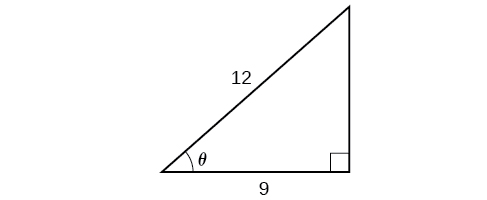
Finding the Exact Value of Expressions Involving the Inverse Sine, Cosine, and Tangent Functions
Now that we can identify inverse functions, we will learn to evaluate them. For most values in their domains, we must evaluate the inverse trigonometric functions by using a calculator, interpolating from a table, or using some other numerical technique. Just as we did with the original trigonometric functions, we can give exact values for the inverse functions when we are using the special angles, specifically [latex]\frac{\pi}{ 6} (30^\circ)\text{, }\frac{\pi}{ 4} (45^\circ),\text{ and } \frac{\pi}{ 3} (60^\circ)[/latex], and their reflections into other quadrants.
- Find angle x for which the original trigonometric function has an output equal to the given input for the inverse trigonometric function.
- If x is not in the defined range of the inverse, find another angle y that is in the defined range and has the same sine, cosine, or tangent as x, depending on which corresponds to the given inverse function.
a. [latex]\sin−1\left(\frac{1}{2}\right)[/latex]
b. [latex]\sin−1\left(−\frac{2}{\sqrt{2}}\right)[/latex]
c. [latex]\cos−1\left(−\frac{3}{\sqrt{2}}\right)[/latex]
d. [latex]\tan^{− 1}(1)[/latex]
Using a Calculator to Evaluate Inverse Trigonometric Functions
To evaluate inverse trigonometric functions that do not involve the special angles discussed previously, we will need to use a calculator or other type of technology. Most scientific calculators and calculator-emulating applications have specific keys or buttons for the inverse sine, cosine, and tangent functions. These may be labeled, for example, SIN-1, ARCSIN, or ASIN.
In the previous chapter, we worked with trigonometry on a right triangle to solve for the sides of a triangle given one side and an additional angle. Using the inverse trigonometric functions, we can solve for the angles of a right triangle given two sides, and we can use a calculator to find the values to several decimal places.
In these examples and exercises, the answers will be interpreted as angles and we will use θ as the independent variable. The value displayed on the calculator may be in degrees or radians, so be sure to set the mode appropriate to the application.
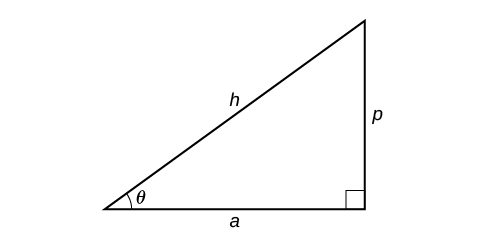
- If one given side is the hypotenuse of length h and the side of length a adjacent to the desired angle is given, use the equation [latex]\theta=\cos^{−1}\left(\frac{a}{h}\right)[/latex].
- If one given side is the hypotenuse of length h and the side of length p opposite to the desired angle is given, use the equation [latex]\theta=\sin^{−1}\left(\frac{p}{h}\right)[/latex].
- If the two legs (the sides adjacent to the right angle) are given, then use the equation [latex]\theta=\tan^{−1}\left(\frac{p}{a}\right)[/latex].